Features
SafeHands isn't organized like software. It's organized like your life, around the moments care actually happens.
👵 Caring for aging parents
💙 Managing your own health
👧 Kids & special needs
🏥 Coming home from the hospital
🏡 Home health
👨👩👧 Whole families
New in SafeHands
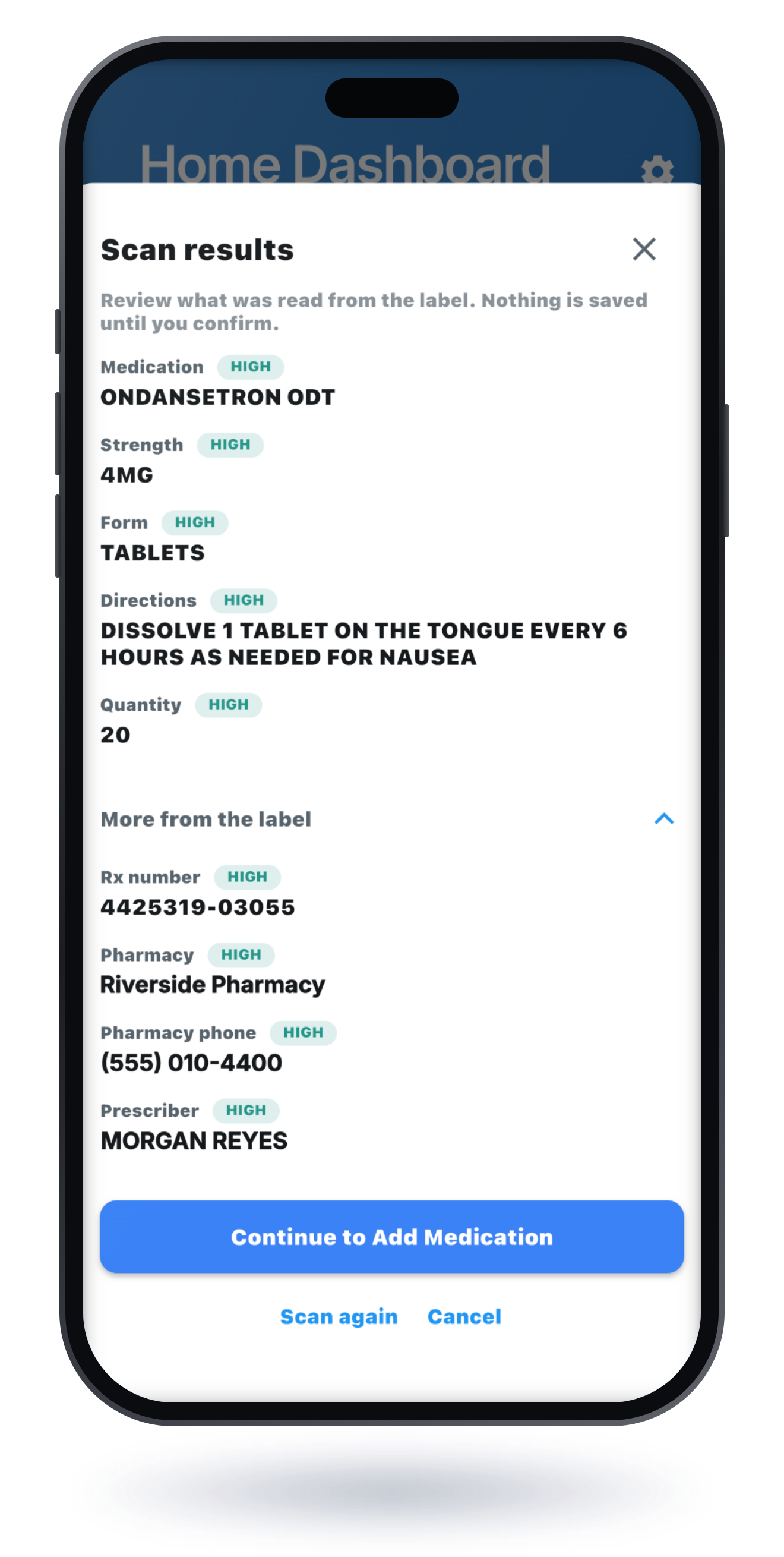
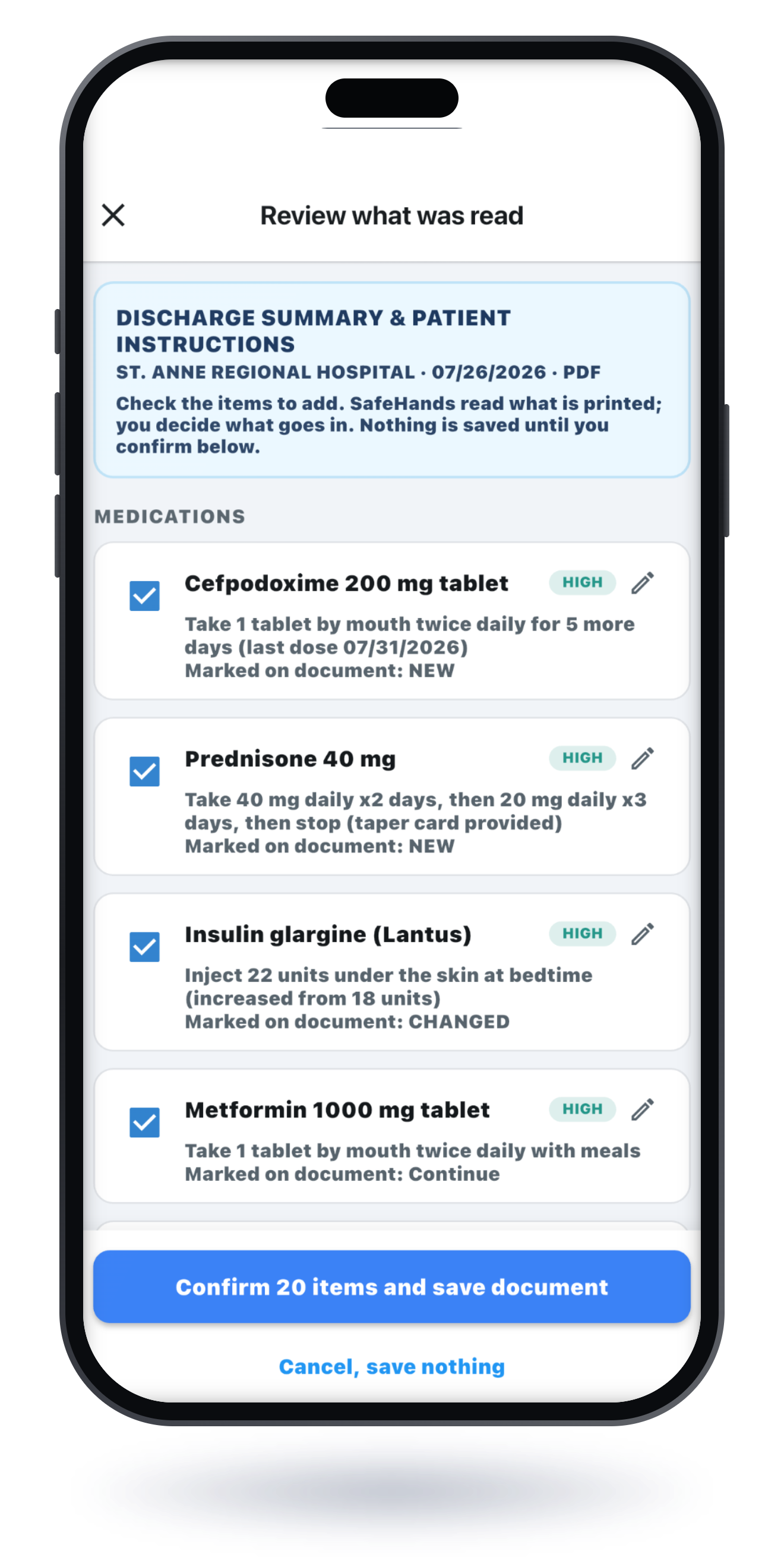
Point the camera at a medication bottle and the name, dose, and directions are filled in for you to review and save. Scan discharge paperwork or an after-visit summary, from photos or a PDF, and SafeHands reads the printed medications, follow-up appointments, vaccines, allergies, and vitals, then shows you everything it found. You check exactly what gets added; nothing is saved without your confirmation. So the family walks out of the hospital with the plan organized and legible in everyone's pocket: ready for home, ready for the follow-up visit, and already in the emergency profile if you ever need it.
Scan a bottle: the label is read and the form is filled in for you to review and save
Scan discharge paperwork or an after-visit summary, from photos or a PDF
Reconciliation built in: duplicates flagged, dose changes shown as updates you approve, stopped medications kept in the record as stopped
Reads what is printed and never interprets; you confirm every change
Health Events
“What do I tell them? It's been a strange couple of weeks and I don't even remember when it started.”
When something starts (a fall, a new symptom, a stretch of just-not-right), give it a Health Event. The notes and symptoms you jot down, plus the vitals, medications, appointments, care tasks, and documents you link to it, line up on one chronological Health Timeline. "When did this start?" becomes something you can scroll instead of something you have to remember.
Everything about one situation in one place: notes, symptoms, vitals, visits, documents
Start dates you can backdate, so the timeline matches when it actually began
Create Summary: a short written recap of what you recorded, created only when you tap the button
Summaries restate what you recorded and never interpret it. They are created only when you tap the button, nothing is sent anywhere automatically, and your health information is never sold.
Free guide: How to track symptoms before a doctor's visit →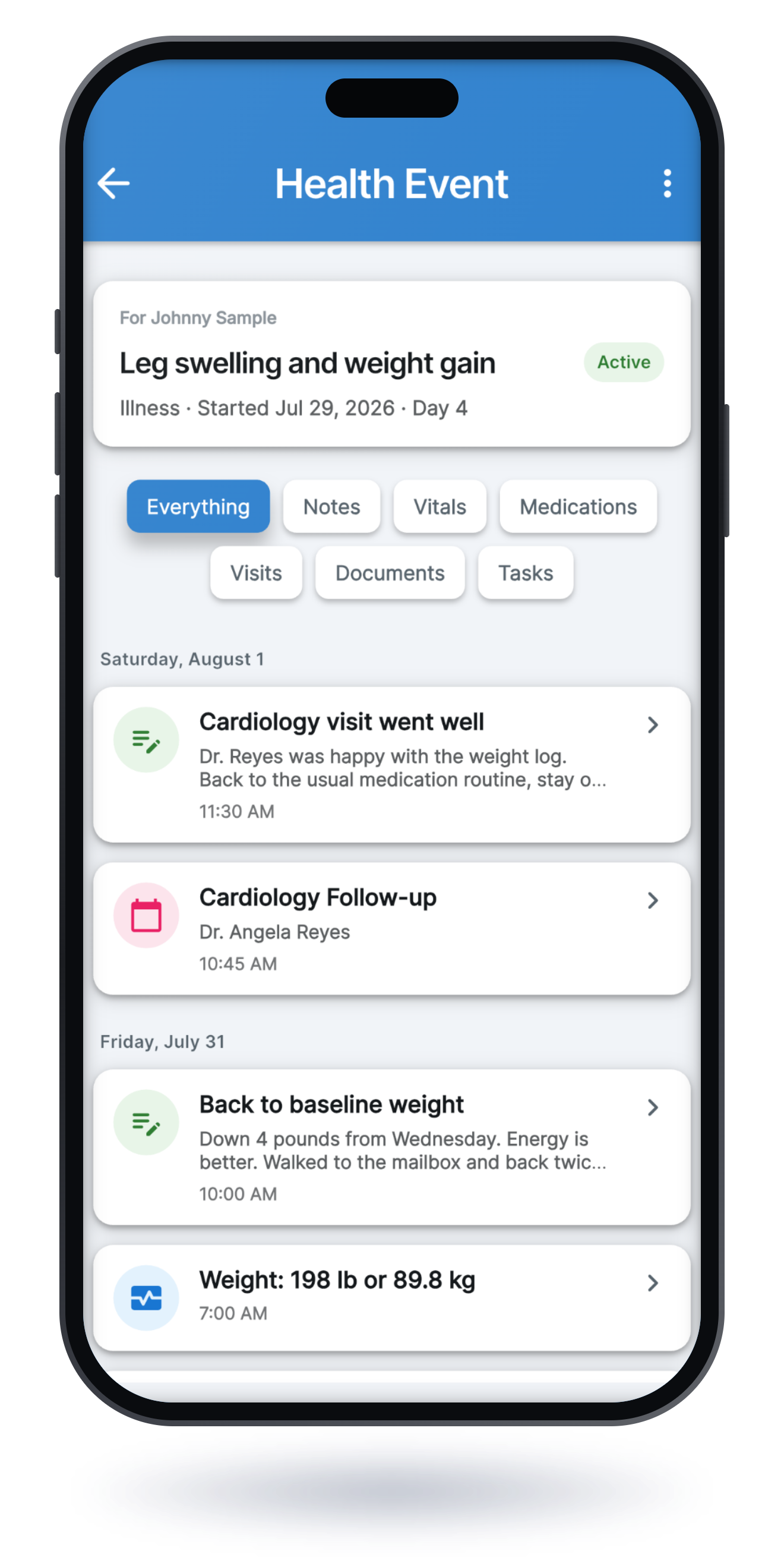
Documents & photos
“The discharge summary is somewhere in the car. Or the kitchen. Or the other car.”
Photograph discharge paperwork, after-visit summaries, insurance cards, and wound photos. They land in the right person's profile, organized and findable, instead of in a glovebox. Everything is there the moment a doctor asks. And SafeHands can read what it stores: open any uploaded document and choose Read with SafeHands.
Snap discharge papers and after-visit summaries the moment they're handed to you
Wound photos with dates: show healing progress at the next visit instead of describing it
Insurance cards and documents, one tap away at check-in
Read with SafeHands: turn a stored document into profile updates you approve, any time
Care Circle
“I update one sibling and forget the other. The group text is chaos.”
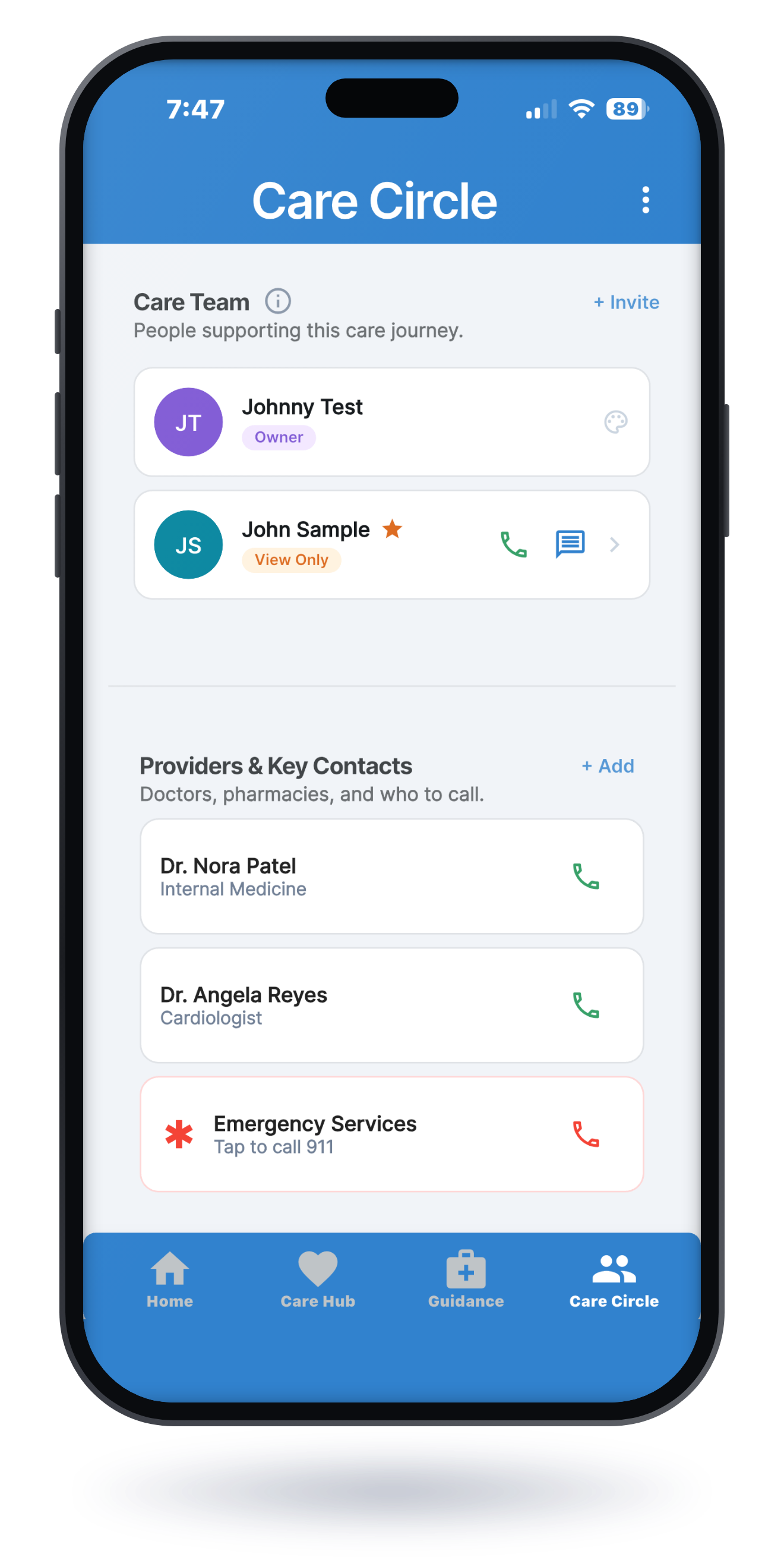
Invite family and trusted friends into a private Care Circle. Everyone sees the same up-to-date picture, with permission levels you control, from full partners to view-only.
Share updates once, not five times
Everyone you invite joins your Care Circle free, at every permission level
Care updates feed: med changes, visit notes, how today went
A plan is only needed when someone wants to create profiles of their own
Emergencies & SafeLink
“The EMTs asked what she's allergic to and my mind went blank.”
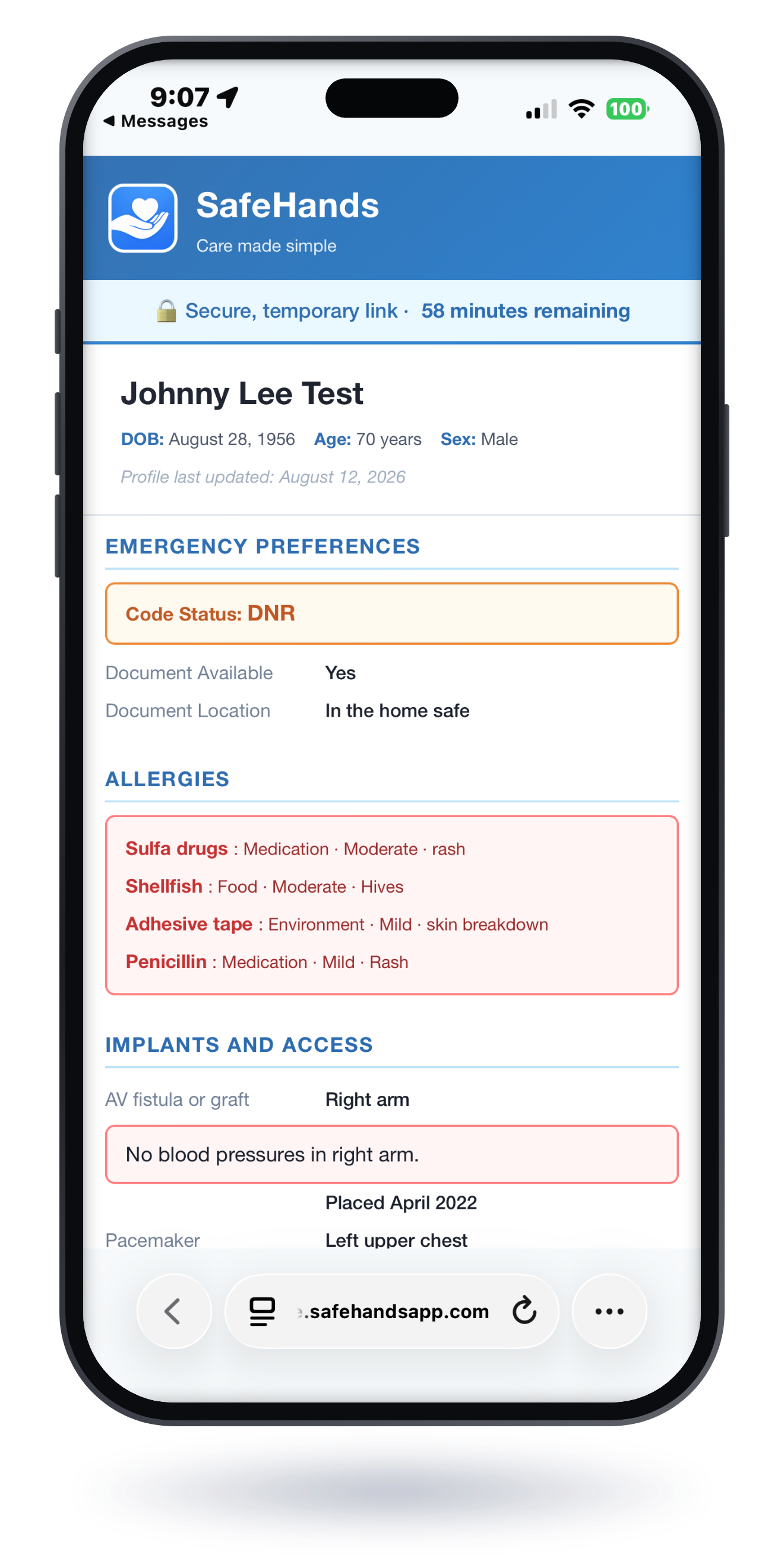
An always-current emergency profile with allergies, conditions, medications, emergency contacts, and care preferences, ready before anyone asks. When someone needs it, SafeLink turns that profile into a secure link or QR code that opens in any browser with no account and no download, for a time window you choose. You can also export the same profile as a printer-friendly PDF for the fridge, the binder, or the glovebox.
Emergency profile: the answers EMS and the ER need first
Updates automatically as medications and conditions change, with no stale printouts
Documented care preferences, so wishes are known and respected
SafeLink: share by secure link or QR code, and you choose who sees it and for how long
Or export a printer-friendly PDF for the fridge, the binder, or the glovebox
Every plan starts with 30 days free, and everyone you invite into your Care Circle joins free.


Also in SafeHands
The rest of the day-to-day work, in the same calm place.
One profile per person: conditions, allergies, vaccinations, assistive devices, oxygen support, and dietary considerations.
Every medication with its dose, schedule, and purpose, plus reminders that keep the day on track and a current list you can show any provider.
Every visit in one place, with your questions saved ahead of time so you never start from a blank intake form again.
Blood pressure, weight, blood sugar, and more, recorded in seconds and kept in order. Imperial or metric, your choice.
Jot down what you noticed and link it to the symptom it describes. Set care tasks with reminders so the small things do not get lost.
Calm, step-by-step help for common concerns, always pointing toward the right level of care. It never diagnoses and never replaces your care team.
Your health information is never sold: not to advertisers, not to “partners,” not to anyone. Built by a nurse who takes that as seriously as you'd hope.
Simple pricing
Full access. Cancel anytime. No surprises. And joining someone's Care Circle is always free, at every access level. A plan is only needed to create profiles of your own.
Most popular
For sandwich-generation & larger families · up to 8 profiles
$19.99/mo
or $199.99/year
Start freeIf you're a discharge planner, a home health team, a senior living community, or a caregiver support group, you know the moment families struggle with most: walking out the door with a folder of paperwork and a changed medication list. SafeHands helps the families you serve keep that information organized, legible, and shared with the people who need it, from discharge day through the follow-up visit. One plan covers a family's whole Care Circle, so the relatives and friends they invite take part at no cost. If you'd like to talk about using SafeHands with your patients or members, we'd love to hear from you.
Get in touch →Not sure yet? The free caregiver resources are yours either way, no download required.